Showing posts with label windows8. Show all posts

Wednesday, September 30, 2015

Add the Theme background pics on windows 8

The windows theme package come nice and handy. But seemed that it could not be changed. Knowing that .doc is just a pseudo zip (Thanks pro-tip!), I tried changing the .theme package to dot-zip. But it could not be read.

Finally found the solution: It seems windows8 has a folder location that you can update so that you can have additional panaromic pictures under the same theme.

C:\Users\bloggerdai\AppData\Local\Microsoft\Windows\Themes\Panoramicx

 ---
-->

Thursday, October 23, 2014

Window went off the screen in Windows 8

So, my window went off the screen, and right click did not show the "move" option.
The easiest way to solve this issue is to press the windows button and arrows keys. Try Win+Left/Right/UP.

Does it do the trick?
The Win+arrow is a nice trick to stack the windows for multiple applications. For example, if you are reading a pdf, and want to make notes  in notepad++ or something then you can select the pdf, press Win+Left Key. Then select the writing app and press Win+Right. This way, the apps share the 50% window each.

Cheers!

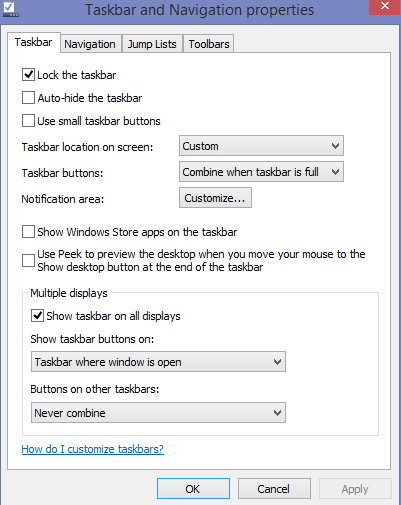
The following is completely unrelated Taskbar properties to manage windows in multiple displays.


---
-->

Tuesday, September 30, 2014

Shortcut to put display to sleep (windows 8)

It is desirable that you can simply put the display to sleep, not the computer... and you happen to be too lazy to lock out the computer


Create a shortcut to
C:\Windows\System32\scrnsave.scr

whenever you click on the shortcut, it will make the screensaver appear. In my case, the screensaver is set to be blank/dark screen.
Therefore, it simulates the "sleep" display as in Mac.


Since I have not set it up to ask for password when awaken from screenshot, I can get the screen right away.
Note that this is meant to only "turn off" the display when you are away for a nature calls.
And it can not replace the usual screen lock.

---
-->

Friday, September 5, 2014

Solution to "system administrator has blocked one drive" in Windows 8.x

Windows 8.1 System does not directly allow the use of skydrive. At least that's what I found when I tried to open the onedrive (skydrive)

Here is the solution on how to get out of the situation

  1. Press the Windows key (start menu) type in gpedit.msc, this will open the Group Policy Object (GPO) on  the Windows 8.1 machine.
  2. Goto Computer Configuration, Administrative Templates, Windows Components, and Onedrive/Skydrive
  3. Double-click Prevent the usage of SkyDive for file storage.
  4. Disable the prevent thigy, and click OK.
  5. Close Group Policy Editor.
Voila!
(Did it work for you?)
---
-->