Showing posts with label pdf. Show all posts

Thursday, June 23, 2011

Zoom the PDF in Google Chrome

Google chrome can be used as the  pdf  viewer. My other options are adobe's reader, Foxit etc.
In order to zoom into the pdf document in Google chrome, take the mouse pointer to the bottom right corner. Then a set of tools appears.
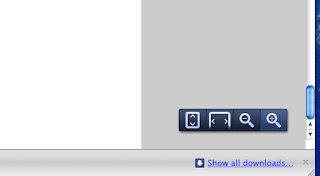
You can then zoom in, zoom out, fit to the width or fit to the height (from right to left as shown in picture above).


Note:
PDF is not owned by Adobe.
http://www.planetpdf.com/enterprise/article.asp?ContentID=No_PDF_is_NOT_owned_by_Adobe&gid=8018

Wednesday, May 18, 2011

"fi" is displayed as Box in Chrome-PDF viewer


classification, simplification, first, find, fixed, specifically, etc what is common in all of them?
"fi" and it is being displayed as a box in my chrome-pdf viewer.
Although it makes sense when we are reading the text, it is annoying.
Is it the case of embedded font by the compiler?
Anything that can be done with it?

Monday, August 2, 2010

Replacing Adobe's PDF reader

Finally I am giving it up.
I have to read different pdf, online, offline. So, as usual, the first choice would be adobe's pdf reader.
However, my Adobe pdf reader has been crashing like a crazy in windows vista. More than 20 times a day. I have to see pdf and adobe pdf viewer does everything except properly showing the pdf files.
:(

So, finally I looked around to see other alternatives. For now Foxit reader seems to be good alternative.
http://www.foxitsoftware.com/pdf/reader/
I am hoping that it will not disappoint me.
Below are few screenshots...


Yes, I did not like the option of putting shortcut icon. However, if it does not crash or install too many irritating updates... I will be happy.